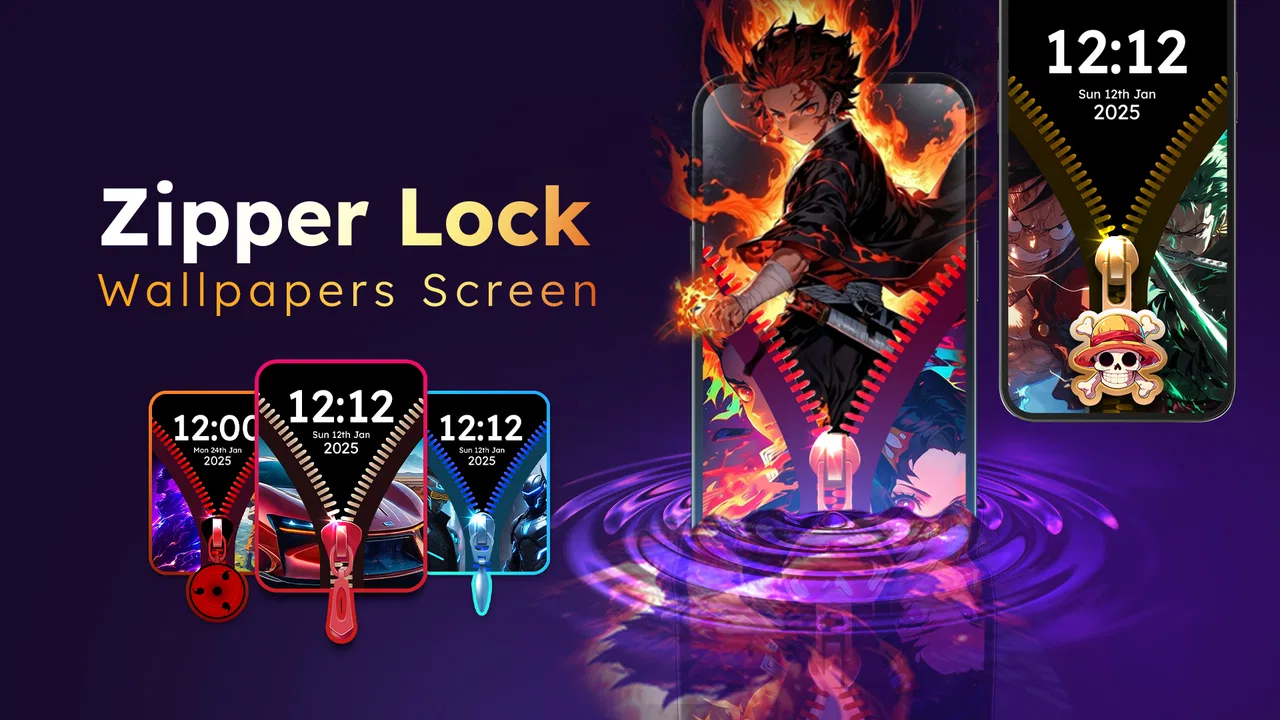
Zipper Lock Wallpapers Screen
- 4.2
- Rating
- 10.00M
- Installs
- Free
- Price
 Analysis by App-foxy
I approached Zipper Lock Wallpapers Screen as a small personalization tool rather than a serious security replacement. Its main idea is simple: it changes the visual experience of unlocking your phone by placing a zipper-style effect and a themed lock-screen wallpaper in front of the usual home-screen routine. After trying it, I found that the appeal is less about adding essential phone functionality and more about giving an ordinary action a playful, noticeable finish.
That distinction matters before you install it. If you want a practical way to make your phone feel more personal, the app can be enjoyable. If you are looking for a stronger security system, a battery-saving tool, or a complete wallpaper platform with deep customization, this is probably not the right place to start. I would describe it as a free personalization app from FunGear inc that focuses on one visual idea and keeps that idea front and center.
The app is aimed at an Everyone audience, so the concept is easy to understand and suitable for casual users. It runs on Android 7.0 and later, which makes it accessible on many older phones as well as newer devices. Its current version is 2.3.6, and its 4.2 average from around twelve thousand ratings suggests that many people enjoy the novelty, although that score also hints that the experience will not suit every phone or every taste.
You May Also Like

 Blood Strike: 2.5 Anniversary
Blood Strike’s Loadouts Turn Every Drop Into a Tactical Gamble
A close look at Blood Strike’s custom loadouts: how fast access to signature weapons reshapes its battle royale rhythm, rewards preparation, and narrows the gap between fights.

 Pandora - Music & Podcasts
Pandora’s Music Is Easy to Start, but Harder to Recover
Pandora’s strength is its low-effort path from a seed to a station. Its weak spot is how much confidence it asks you to place in connection, setup, and quiet recovery.

 8 Ball Pool
 Is Built on Rivalries, Rematches, and Routine
A close look at the rivalries, rematches, shared routines, and unanswered safety questions that turn a quick pool match into a persistent mobile community.

 Samsung Music
’s Quiet Strength Is Playing What You Already Own
Its reach comes less from spectacle than from dependable access to a personal library. That simplicity is both the app’s strongest retention engine and its ceiling.

 AccuWeather: Weather Radar
AccuWeather Review: A Quick, Clear Forecast for Everyday Decisions
For everyday plans, the best forecast is the one you can understand quickly. AccuWeather makes rain timing, radar, and local conditions easy to act on, with a few trade-offs.

 Hill Climb Racing
Why Hill Climb Racing Still Turns Crashes Into One More Run
A tiny car, a bumpy hill and one more upgrade: Hill Climb Racing keeps resurfacing because its simple chaos makes every near-miss feel personal.
More From Our News Desk



What the first launch feels like
After installation, I recommend opening it when you have a quiet moment rather than immediately switching back to another app. The first useful goal is not to browse endlessly; it is to understand what the zipper effect is supposed to do and how it fits into your normal unlocking habit. The app makes the most sense when you treat the lock screen as a visual layer that you are choosing for your phone, not as a replacement for every security setting already on the device.
The basic promise is easy to grasp. You select a zipper-style presentation, use a matching wallpaper, and then see that design when you unlock the phone. That creates a more playful moment than a standard static lock screen. I noticed that the effect is especially appealing on a phone used frequently throughout the day, because even a short interaction can feel more distinctive when the screen has a theme instead of looking exactly like the default Android setup.
One practical point is worth keeping in mind: the app’s value depends heavily on whether the visual style matches you. A zipper animation can look fun, colorful, or deliberately unusual, but it is not a neutral design. I would be comfortable recommending it to someone who likes decorative phone themes, children using a family device, or anyone who enjoys changing their screen style regularly. I would be more cautious with someone who prefers a clean, nearly invisible lock screen.
Because the app is free to install, trying the basic experience does not require an upfront purchase. There are in-app purchases ranging from $4.99 to $25.99 per item, so I would spend time with the free experience before paying for anything. The most sensible approach is to decide whether the zipper interaction itself remains enjoyable after several ordinary unlocks. If it starts feeling like an extra step, additional decorative content will not solve that underlying issue.
Setting it up without rushing
My advice for a first-time user is to change one thing at a time. Start with the wallpaper or zipper presentation you find easiest to recognize, then test the result by locking and unlocking the phone normally. This makes it much easier to tell whether the design is working as expected. If you change several visual choices at once, it becomes harder to identify which element you actually like and which one is creating friction.
Do not judge the app only from its preview. A design that looks attractive while you are browsing may feel too busy when it appears every time you check a message or the time. I found that the best choice is usually the one with a clear central effect and enough contrast to make the unlocking action understandable. A visually crowded wallpaper can make the zipper look less like an intentional interaction and more like decoration placed on top of the screen.
The first setup is also a good time to decide how much the app should influence your everyday routine. If you unlock your phone dozens of times while working, studying, or commuting, a longer-looking animation may become tiring even if it is entertaining at first. If you mainly want a fun appearance for occasional use, you can be more adventurous. This is one of the app’s less obvious trade-offs: the feature is most visible precisely because it appears during a repeated action.
I would also keep the phone’s existing security habits in mind. The zipper presentation is a visual personalization choice, not a reason to abandon a passcode, pattern, fingerprint, or other protection your device already uses. If the phone contains work information, private conversations, or payment details, keep your normal security method active and view the app as a decorative layer. That simple distinction prevents disappointment and avoids treating an entertainment-focused tool as a security upgrade.
Reaching the first meaningful success
The first successful result is not merely seeing a zipper image in the app. It is locking the phone, unlocking it naturally, and deciding that the effect improves the experience rather than interrupting it. I suggest testing this several times in different situations: once while sitting still, once when you are in a hurry, and once after receiving a notification. That small routine gives you a more honest impression than a single demonstration.
A realistic example is checking your phone during a morning commute. You may unlock it to read a message, put it away, and repeat the action a few minutes later. In that situation, the app works best when the visual sequence is immediately understandable and does not make you pause to figure out what to do. The zipper theme can add personality to those quick checks, but if the interaction feels slower than your regular lock screen, the novelty may wear off quickly.
Another useful scenario is a shared family tablet or secondary phone where appearance matters more than advanced customization. A zipper-themed screen can make the device feel less generic and give a younger user a more engaging interface. I would still test it with the person who will use the device, because a design that feels playful to one user may seem confusing to another. The app’s simplicity is an advantage here, but it also means there may be fewer ways to adapt the experience to very specific preferences.
For a personal phone, I found the strongest use case was occasional refreshment rather than permanent dependence. You can enjoy the effect for a while, then return to a simpler look when you want less visual activity. That mindset makes the app easier to appreciate. It is not trying to replace every personalization option on Android; it gives you a particular theme and a different feeling for unlocking.
Where new users can become confused
The most likely confusion is assuming that the zipper effect changes the underlying security process. It does not make a weak passcode stronger, and it should not be understood as a substitute for the phone’s built-in protection. Think of the visible zipper action as the presentation around unlocking. Your actual device security still deserves attention, especially if you use the phone for banking, work, or private accounts.
Another possible misunderstanding is expecting a full wallpaper editor. The app’s identity is built around zipper effects and related lock-screen visuals, so I would not install it expecting the same breadth as a general wallpaper catalog or a complete launcher. A general wallpaper app is a better choice if your priority is browsing many image categories, while the phone’s standard personalization controls may be better for someone who wants a fast, understated change.
Some users may also wonder why a free app includes paid items. That is normal for this type of personalization product, but it is still worth approaching purchases carefully. Use the free portion long enough to decide whether you enjoy the central interaction. I would not pay simply because a design looks attractive in a preview. The important question is whether you will still want to see it during routine unlocking after the initial excitement has passed.
Compatibility is another reason to test rather than assume. The app supports Android 7.0 and later, but phones can still differ in how they handle lock-screen presentation, system themes, and manufacturer-specific behavior. If the result does not appear exactly as you expected, first return to the app’s own setup and check that your selected visual choice is still active. Then compare the phone’s ordinary lock screen behavior. That basic comparison can show whether the issue is with the chosen design or with the way your device handles customized screens.
I would also avoid changing the app while you are troubleshooting several unrelated phone settings. For example, if you are simultaneously switching system themes, changing the wallpaper through another app, and adjusting security options, you may not know which change affected the result. A cleaner workflow is to leave other personalization tools alone, configure the zipper design, lock the phone, and test it. Once the first result is stable, you can decide whether to add other visual changes.
How it compares with ordinary alternatives
Compared with the standard Android lock screen, this app is more expressive but less neutral. The built-in option usually wins when you want the quickest path to a wallpaper, a familiar unlock method, and minimal visual distraction. Zipper Lock Wallpapers Screen wins when the act of unlocking itself is part of the fun. That is a meaningful difference, but it is also the reason I would not recommend it automatically to every Android user.
Compared with a general wallpaper app, it is more focused. A broad wallpaper service may offer a larger range of styles, while this app gives you a recognizable zipper concept. If you change wallpapers often and want landscapes, abstract art, photographs, or minimalist backgrounds, a general alternative may offer better variety. If you specifically want your lock screen to feel like an interaction rather than a still image, this app has a clearer purpose.
Compared with a launcher or full theme package, it is less disruptive. You do not need to redesign the entire home screen just to experiment with a zipper-inspired lock screen. That makes it a gentler choice for someone who likes the current icons and layout but wants a more personal first screen. The trade-off is that you should not expect the broad control offered by a complete theme system. Its strength is focus, not depth across the whole phone.
There is also a practical difference from purely decorative wallpaper. A static image can fade into the background after a few days, while an unlocking effect remains noticeable because it is tied to an action. That can be refreshing, but it can also become repetitive. In my view, this is the central decision: do you want a lock screen that quietly displays an image, or one that deliberately calls attention to the moment you open the phone?
Who should try it and who should skip it
I think the app is a good match for users who enjoy playful personalization, frequently refresh their phone’s appearance, or want a themed lock screen without redesigning every part of Android. It can also suit a secondary device where a fun visual identity matters more than a restrained professional look. Since it is free to begin with and supports older Android versions, it is relatively easy to test before deciding whether it belongs in your daily routine.
I would skip it if you want a completely silent, instant unlock experience. I would also choose a standard lock screen or a more conventional wallpaper tool if you need a formal appearance for work, dislike animated-looking interactions, or want extensive control over typography, widgets, and the entire device theme. Someone seeking stronger security should focus on the phone’s built-in protection instead of treating a zipper effect as a security feature.
Users who are sensitive to repeated visual motion should make their decision after several normal unlocks rather than after one enthusiastic test. The same effect that feels charming on the first day may become distracting when you are checking the time quickly. I would also be careful about buying several paid items before establishing a stable favorite. The app’s core appeal is narrow enough that more choices are only useful if the basic interaction already feels right.
My practical verdict after using it
FunGear inc has created a focused personalization app with an immediately recognizable idea. The zipper effect gives the lock screen a playful identity, and the free entry point makes experimentation straightforward. With over ten million installs, it has clearly reached a large audience, although popularity alone does not make it ideal for every device or personality. I see it as a light customization layer, not an essential phone utility.
The best way to approach it is to define a small first goal: choose one design, test it through several real unlocks, and keep it only if it makes the routine more enjoyable. That workflow helps answer the questions that a preview cannot: Is it comfortable when you are in a hurry? Does the wallpaper remain readable? Does the effect feel personal or merely novel? Do you still like it after the first few minutes?
My final recommendation is positive but specific. Try Zipper Lock Wallpapers Screen if you want your Android lock screen to feel more playful and you understand that the app is about appearance, not added security. Keep your normal device protection in place, test the free experience before considering the paid items, and compare it with the default lock screen during everyday use. For me, it succeeds when treated as a fun visual change; it falls short only when someone expects a complete theme system or a major functional upgrade.
FAQs for Zipper Lock Wallpapers Screen
01What is Zipper Lock Wallpapers Screen, and how does it work?
Zipper Lock Wallpapers Screen is a unique lock screen app that adds a creative twist to your phone's security. Instead of the standard swipe or pattern, it uses a zipper animation to unlock your device. Users can customize the look with various backgrounds and zipper styles, making the unlocking experience both fun and personalized.
02Is Zipper Lock Wallpapers Screen secure for my device?
While Zipper Lock Wallpapers Screen offers a fun way to unlock your phone, it should be noted that it primarily enhances aesthetics rather than security. It doesn’t replace your device’s built-in security features like PINs or biometrics. For optimal protection, it’s recommended to use it alongside your phone’s existing security measures.
03Can I customize the wallpapers and zippers in the app?
Yes, customization is a key feature of Zipper Lock Wallpapers Screen. Users can choose from a variety of wallpapers and zipper styles to match their personal taste. The app offers a range of themes, allowing you to change the look of your lock screen as often as you like, keeping it fresh and engaging.
04Does Zipper Lock Wallpapers Screen consume a lot of battery?
The app is designed to be lightweight and efficient, minimizing battery consumption. However, as with any app that runs continuously in the background, there may be a slight impact on battery life. Users are encouraged to monitor usage and manage other background apps to optimize performance.
05Is Zipper Lock Wallpapers Screen available for both Android and iOS?
Currently, Zipper Lock Wallpapers Screen is primarily available for Android devices. Users can download it from the Google Play Store. If you're an iOS user, you might need to look for similar apps, as the availability can vary. Always check the app store for the latest version and compatibility updates.
Pros
- Unique and interactive lock screen feature.
- Wide variety of wallpaper options.
- Easy to customize and set up.
- Lightweight app
- doesn't slow device.
- Free to download and use.
Cons
- Contains in-app advertisements.
- Limited functionality beyond aesthetics.
- May not suit professional users.
- Occasional app crashes reported.
- Some wallpapers lack high resolution.

Zipper Lock Wallpapers Screen
Gallery